

富士施乐DocuPrint CP118 w for win7/8/10 64bit
富士施乐DocuPrint CP118w打印机驱动适用于同型号的打印机,不仅仅为打印机的正常工作提供了支持,同时也为可以帮助用户解决打印机与电脑之间连接异常或者无法打印等问题,在这里小编提供了驱动下载,欢迎需要的朋友来下载使用!
驱动安装方法
1、下载文件,双击运行;
2、点击【安装】;

3、勾选我接受,点击【下一步】;
4、选择安装类型,点击【下一步】;
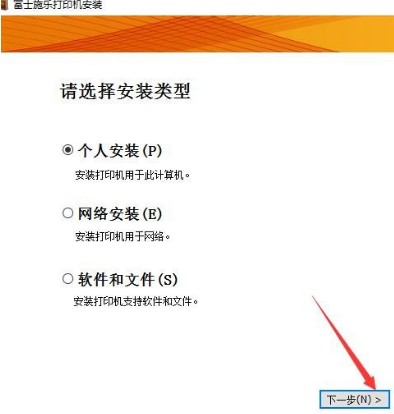
5、完成安装后,重启电脑即可。
打印机功能特性
一、无线打印
1、支持AirPrint和Google Cloud Print
2、Wi-Fi Direct
3、一键式按钮即可实现连接
二、卓越的色彩表现
1、卓越色彩
2、出色的高亮表现
3、速度更快——生产力更高
4、高速色彩校准
三、兼顾易用性和可持续性的设计
四、效能更高、废弃更少
1、无故障打印、环保型技术
2、废弃更少
3、更环保的墨粉
五、智慧功能带来使用便捷性
1、4.3英寸彩色触摸屏
2、延长墨粉使用寿命
-
戴尔wm118无线鼠标,怎样和电脑进行配对连接呢?只有将鼠标和电脑配对连接好,才可以正常的工作发挥功效,还不会使用的小伙伴赶紧看过来啦 戴尔wm118是直接的usb接收器配对使用的 就是上面红框里的那个,取下来,插在电脑的USB接口上,等一会就可以工作了

-
戴尔(DELL)WM118无线鼠标,笔记本电脑台式机均可使用,小巧便携,想必很多小伙伴都有入手一款吧!今日为大家介绍的是——戴尔wm118鼠标电池更换方法,还不会整的赶紧来参考一下吧 戴尔wm118鼠标的更换方法其实很简单的,只要将鼠标下面的电池盖子扣开,然后去取出电池,再更换一个新的就可以了 就是上面的位置
-
萤石cp1摄像头可以满足大家的一切需求,因为根据需求与目的不同,大家有的时候,需要吊装。通俗说,就是将摄像头导过来安装。那么,今天我们就来解答的是萤石cp1怎么挂到墙上这个问题。 首先你需要考虑的是,你想要摄像头工作的范围,就是视角。找回视角就可以了,如果是正面安装的话,你需要一些辅助工具,或者材料才能满
-
奔图 CP2200DN,彩色激光单功能自动双面有线打印机,办公商用均可。很多小伙伴买来之后不会安装使用,到底应该如何操作呢?今日小编就来为大家解答疑惑,速来围观 具体的操作内容太多了,大家可以下载顶端的奔图cp2200dn说明书详细查阅一下 以连接电缆为例 小心—电击危险:为避免电击危险,请不要在雷雨天气时设置本产品,
-
日常生活中,大家应该都会使用打印机吧,使用打印机的时候不仅要连接蓝牙,还要连接网络。但是很多用户都不知道应该如何设置网络,以富士施乐cp318dw为类,告诉大家具体的设置方法吧。 设置方法 1、打开控制面板,点击查看设备和打印机。 2、鼠标右键点击打印机,选择属性 3、单击详细资料,然后单击添加端口。 4、在弹出的
-
奔图 CP2200DN 彩色激光单功能打印机,支持自动双面,办公商用使用均可。那么其如何设置中文呢?这也是很多小伙伴都在咨询的一个问题,今日小编就来我大家解答疑惑 一般我们的机器买来都是中文显示的 如果是还在电脑上操作,是因为显示的话,那就是驱动的问题 更换一个中文显示的驱动就可以啦
-
奔图CP2200DW 彩色激光打印机,支持自动双面打印+无线WIFI网络打印,性能超强悍的,外加适中的价格,备受新老用户的喜爱。那么如何拆除其无线模板呢?这也是大伙都在问的一个问题,今日小编就来解答疑惑 很遗憾的是奔图cp2200dw无线模块是无法拆除的哦 拆掉机器会报错,只能把无线关了,拆了以后开机机器会报错,无法使用
-
奔图cp2510dn可以打印照片吗?可以的话又该如何操作呢?虽然现在电子照片都已普及,但是仍有很多小伙伴喜欢打印出照片摆出来。那么奔图cp2510dn照片打印情况具体如何呢?今日小编就来为大家解答疑惑 奔图cp2510dn是一款A4彩色激光单功能打印机 所以不支持照片的打印呢 想要打印照片的话,需要选择其他款式才可以哦
-
奔图cp2200dw彩色激光自动双面无线打印机,小体积大能量,日常办公商务的使用需求均可满足。想要机器正常运行工作,是需要和电脑连接的,自己的电脑是xp系统的,可以连接吗 奔图cp2200dw支持xp系统 我们只要下载相关的打印机驱动就可以了
-
奔图cp2506dn plus硒鼓坏了,就需要对其进行更换,不然机器将无法正常的而工作运行。那么硒鼓要怎么拿出来呢?又该如何更换呢?还不会整的小伙伴赶紧来参考一下吧 更换成像组件 1打开盖门 B。 警告—可能的损坏:为防止静电放电造成的损坏,请在进入或接触打印机的内部区域之前触摸打印机的任何外露金属框架。 2打开盖门 A
-
富士施乐cp318dwd打印机想要设置ip地址,到底应该如何操作呢?每个打印机都会有自己专属的ip地址,这样有便于后期的网络传输和工作 将IP设定分配到打印机 您需要将IP地址、子网掩码(仅适用 于IPv4)和网关地址分配到打印机,方可在网络环境中使用。打印机提供IPv4、IPv6和双栈连接。如果网络同时支持IPv4 和IPv6,则选择双栈
-
奔图cp2506dn plus是一款,性能优秀的彩色激光打印机。因其优秀的性能,深受许多小伙伴的喜爱。但有很多小伙伴不知道,奔图cp2506dn plus可以复印吗?接下来就让小编来告诉大家吧。 奔图cp2506dn plus具有复印功能,并且黑白打印速度为33ppm、彩色打印速度为33ppm十分快速。以上就是关于“奔图cp2506dn plus可以复印吗”的
- 富士施乐DocuPrint P118 w for win7/8/10 32bit
- 富士施乐DocuPrint P118 w for win7/8/10 64bit
- 富士施乐DocuPrint M118w for win7/8/10 64bit
- 富士施乐DocuPrint CP318 dw for win7/8/10 32bit
- 富士施乐DocuPrint CP318 dw for win7/8/10 64bit
- 富士施乐DocuPrint CP119 w for win7/8/10 32bit
- 富士施乐DocuPrint CP119 w for win7/8/10 64bit
- 富士施乐DocuPrint CP405d for win7/8/10 32bit
- 富士施乐DocuPrint CP405d for win7/8/10 64bit
- 富士施乐DocuPrint CP228w for win7/8/10 32bit