

富士施乐DocuPrint P268 dw for win7/8/10 32bit
打印机驱动安装
1、下载文件,双击运行;
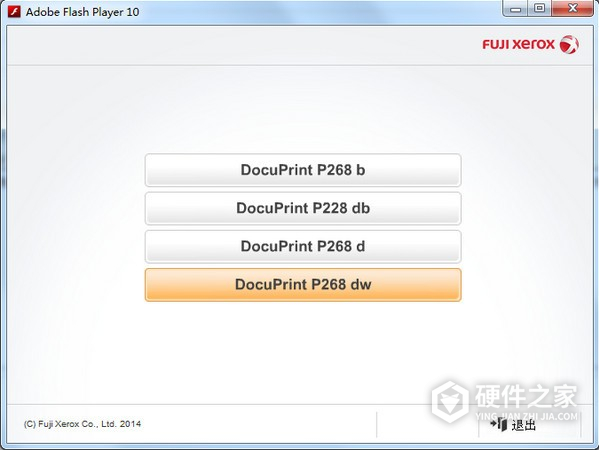
2、选择型号;
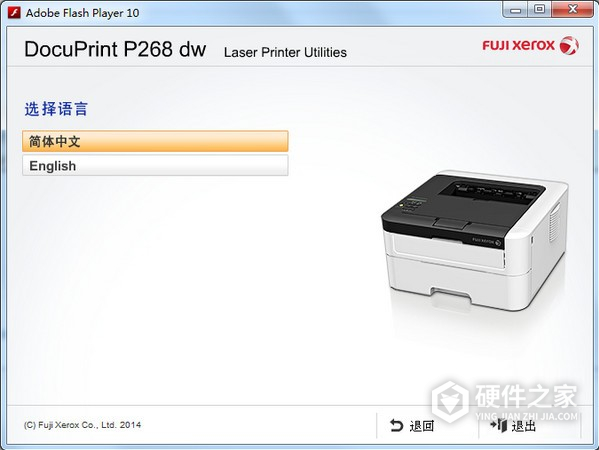
3、选择语言;
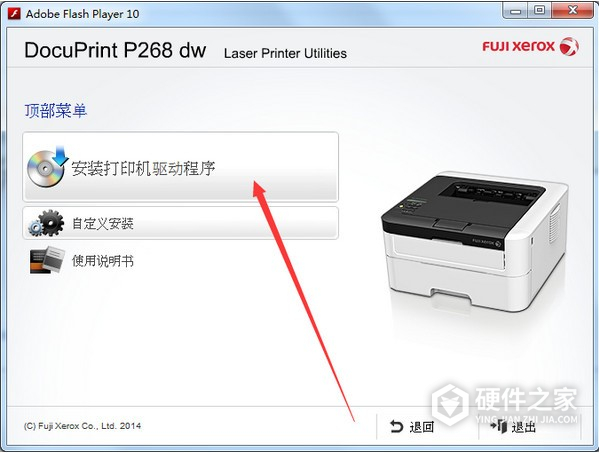
4、点击【安装】;
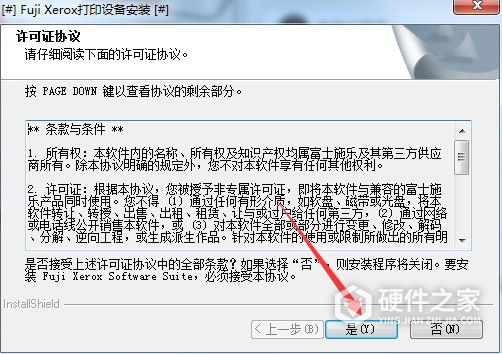
5、点击【是】;
6、点击【下一步】;
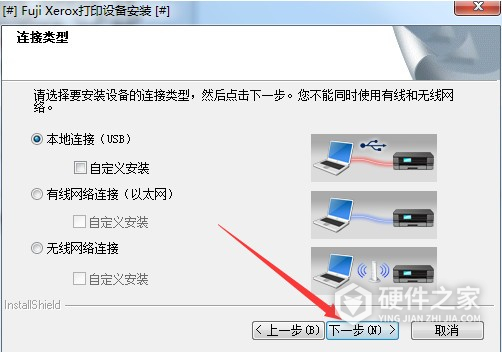
7、完成安装后,重启电脑即可。
-
有小伙伴们好奇富士施乐m288dw与m268dw区别,今天小编就为大家解答,感兴趣的小伙伴们可以了解一下,希望可以帮助到大家。 富士施乐m288dw与m268dw没有太大的去别,性能外观都是差不多的,看小伙伴们自己喜欢。

-
震旦AD268可实现26页/分钟的中高速输入,预热时间低于15秒,首页复印时间低于5秒,性能优于同速度段竞争品牌。但有很多小伙伴很疑惑,震旦ad268怎么设置共享?其实非常简单,接下来就让小编来告诉大家吧。 震旦ad268设置共享教程 1、网络打印机设置共享,首先就是要在同一个网络内也就是要有局域网,才可以实现打印机网络共
-
震旦ad268可将文件彩色扫描为TIFF/PDF/JPEG格式文档,并可发送到FTP/SMB/电子邮件/USB。当配合自动双面送稿器,还能够快速地对原稿进行双面扫描,性能十分强大。很多小伙伴很疑惑,震旦ad268怎么安装?其实非常简单,接下来就让小编来告诉大家吧。 震旦ad268安装教程 1、首先,把打印机连接上电脑,然后电脑点击打不win图标
-
得力P2500DW黑白激光打印机,支持无线云打印,手机连接使用超便捷。可是怎样才可以连接上手机呢?想必还有很多的小伙伴还不会整呢吧!今日小编就来为大家解答一下,速来围观 首先我们需要一个得力e+客户端,直接扫描机身上面的二维码 苹果手机用户直接通过“App Store”搜索“得力e+”。 微信搜索【得力随心印】小程序直连
-
大家在办公的时候,难免户使用到打印机,可以说这是我们办公的时候不可缺少的一件东西。部分用户在使用富士施乐p288dw的时候,发现它不能设置中文,这究竟是怎么回事呢? 据了解,这款打印机是不能支持设置中文模式的。所以大家在购买的时候可一定要注意哦。有些读不懂英文的,可要谨慎购买哦。
-
奔图p3300dw硒鼓需要更换,应该选择什么型号的硒鼓呢?配置错误的话,机器就很难正常工作了,甚至还有可能会损坏。想必很多小伙伴都在疑惑适合奔图p3300dw的硒鼓吧!今日小编就来为大家解答疑惑 适合的硒鼓有很多,但是个人还是推荐选择自家品牌的——奔图DL-411鼓组件 一个牌子的会适配性上会减少很多不必要的麻烦 另外其
-
富士施乐(Fuji Xerox)P378dw A4黑白激光打印机,那么想要设置一个静态ip到底应该如何操作呢?每个机器都会有自己的固定IP,这样便于设备的连接以及文件发送等 首先我们的准备好ip地址、子网掩码地址和网管地址 使用箭头按钮选择“网络——确定——“有线LAN”——“确定”——“TCP/IP”——“确定”——启动方式——确定
-
有小伙伴们好奇震旦ad268e怎么改ip地址,今天小编就带着大家的疑问收集了以下内容,感兴趣的小伙伴们可以了解查看一下,希望可以帮助到大家。 1、在Windows10系统桌面,双击桌面上的“控制面板”图标,打开控制面板设置窗口。 2、在打开的控制面板窗口中,点击“设备和打印机”图标。 3、在打开的设备和打印机窗口中,右键
-
有很多小伙伴们买回来的打印机不知道如何使用,今天小编就为大家解答富士施乐p378dw设置网络打印机,感兴趣的小伙伴们可以了解一下。 下载驱动并解压;运行打印机驱动安装程序“start.exe”;点击“下一步”;打钩“我接受以上许可证协议”,点下一步;点击选中“有线网络连接”,并下一步;点下一步;等程序自动搜索后未找
-
震旦ad268e怎样进入维修模式?这个问题是非常受大家的关注的,今天小编就带着大家的疑问收集了以下内容,感兴趣的小伙伴们可以了解查看一下,希望可以帮助到大家。 1、按“*”键,立即同时按下“2”和“8”的按钮。如果按下该系列按钮太慢不会进入服务模式。 2、按“*”键,然后松开。佳能复印机将表明你是在服务模式。 3、
-
很多手机都有WIFI破解软件,我们的网被人蹭,搞得自己都不能正常上网了,那么水星d268g怎么设置防蹭网呢?现在小编就来教大家怎么设置。一起看下去吧! 1、进入路由设置界面后,在左侧有无线设置 2、按箭头指的点进去 3、这里要注意,状态这里选生效,描述中可随意填,MAC地址填我们自己的无线设置网卡地址, 4、保存后会出
-
富士施乐m268z想要发送传真,到底应该如何操作呢?这也是打印机基础的操作之一,也是日常最常用到的一项功能,还不会操作的小伙伴请参考以下操作 使用计算机进行传真 通过Fuji Xerox PC-FAX 功能,您可以将使用计算机.上任何应用程序创建的文件作为标准传真进行发送,还可以附上传真封页。 1在您的应用程序中, 选择文件,
- 富士施乐DocuPrint P268b for win7/8/10 32bit
- 富士施乐DocuPrint P268b for win7/8/10 64bit
- 富士施乐DocuPrint P288dw for win7/8/10 32bit
- 富士施乐DocuPrint P288dw for win7/8/10 64bit
- 富士施乐 DocuPrint P388dw驱动 For Win XP/7/8/10
- 富士施乐Xerox DocuPrint P378 dw 激光打印机驱动 For Win XP/7/8/10
- 富士施乐DocuPrint M268z for win7/8/10 32bit
- 富士施乐DocuPrint M268z for win7/8/10 64bit
- 富士施乐DocuPrint P455d for win7/8/10 32bit
- 富士施乐DocuPrint P455d for win7/8/10 64bit